Find coherent short-form moments with reasons, scores and editable boundaries.
The complete Windows studio arrives October 2026
Find the moments.
Finish the video.
Turn one long video into its strongest clips, a fully captioned original, thumbnails or a polished long-form edit—privately, on your own PC.
Unlimited local processing with Pro No AI credits Specialist local analysis No footage upload
TLTO Studio · Creator workspace
LOCAL SESSION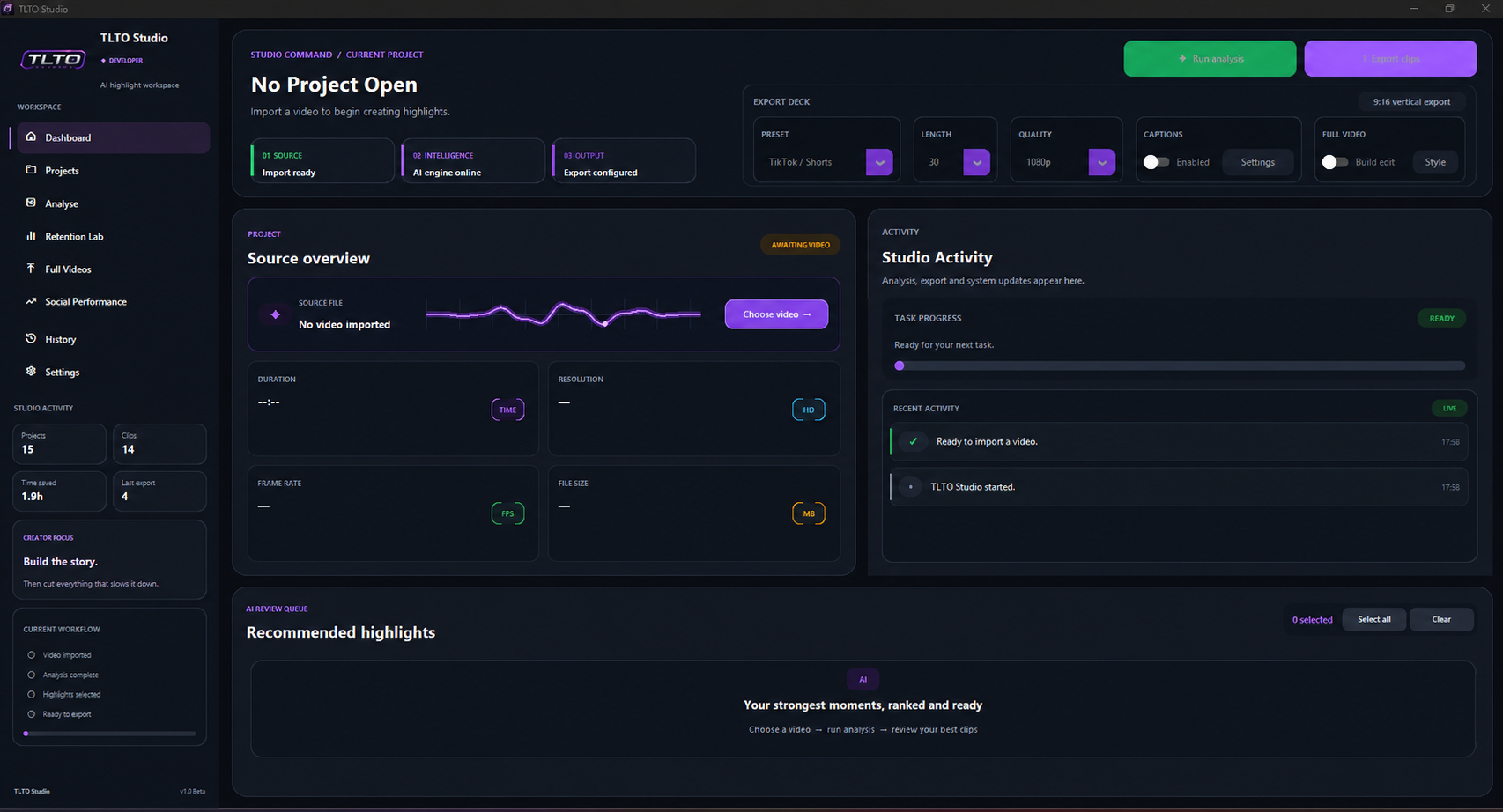
01 · UNDERSTANDWhole-video local intelligence
02 · CREATEFour clear ways to finish
October early access
Be there when
TLTO Studio launches.
Register your interest for launch progress, early-access opportunities and the moment the complete Windows studio is ready.
Launch-day notificationEarly-access opportunitiesFounding creator updates
One focused production studio
Less repetitive work.
More finished video.
TLTO combines discovery, captions, editing and dependable export without hiding the creative decisions. Process locally without counting credits, then choose the finished result that fits the project.
One source. Four finished outcomes.
Do more with
every recording.
Import once and let the same private Project Brain support every route through the studio.
Keep every frame and add word-timed animated captions to the complete video.
Build a longer directed cut when the story needs more room than a short clip.
Create strong visual choices from the same source without leaving the project.
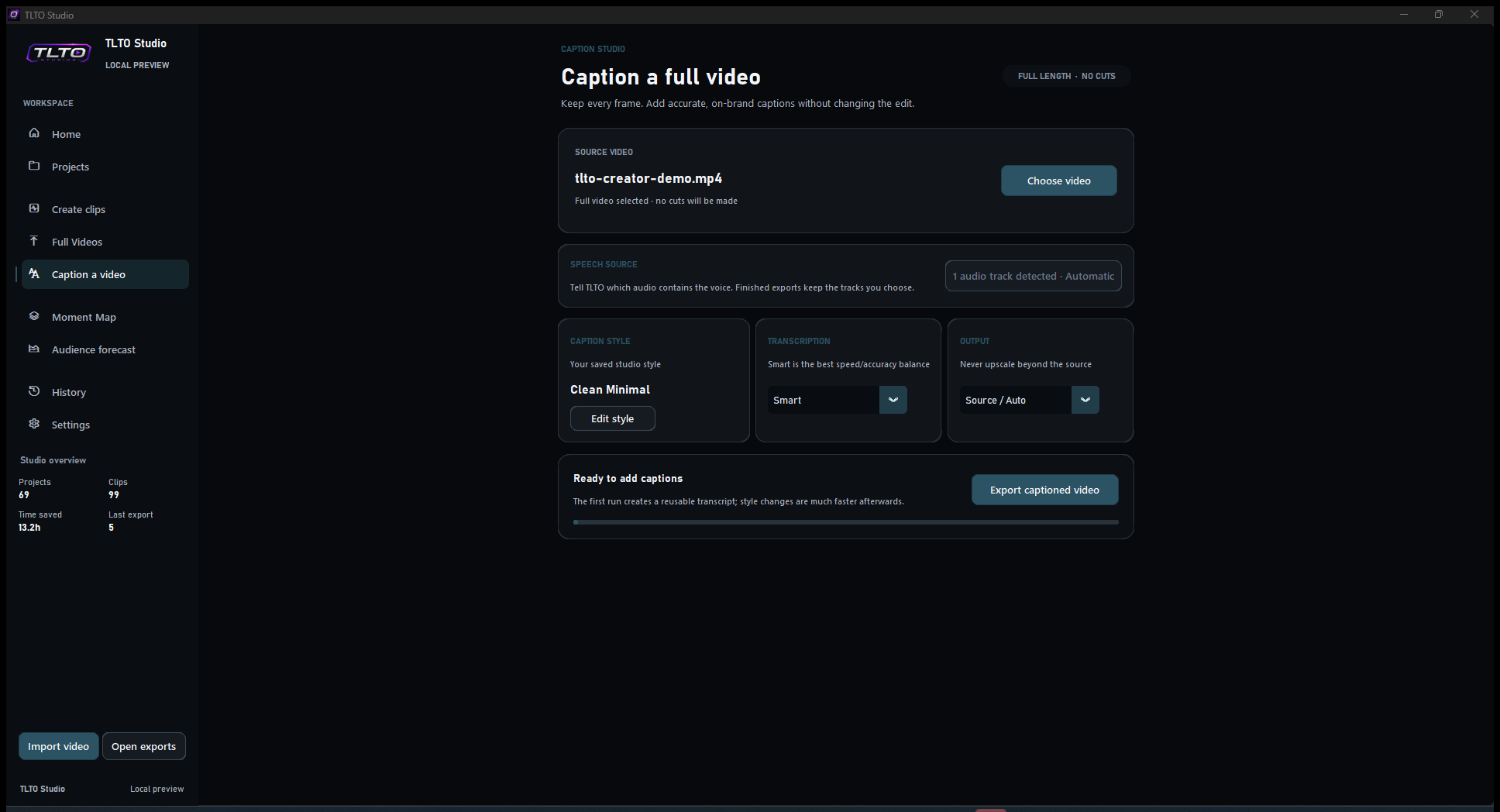
New · Caption a Video
Keep every frame.
Add better captions.
When the edit is already right, choose the full video, pick a style and export. TLTO preserves the picture and duration while its managed local speech system creates word-level captions on your PC.
Smart by defaultClear speech stays fast while uncertain areas can receive a deeper local check.
Review less, trust moreTLTO highlights uncertain words so you can focus attention where it is actually needed.
Reusable transcriptRestyle and re-export much faster after the first pass.
Review before render
Watch it. Follow it.
Fix it in context.
Long videos need more than a text box. TLTO keeps playback and the complete transcript together so you can hear the line, see the active words and make a correction without losing your place.
LIVE VIDEO REVIEW
Make every word land.
06:42 / 12:08
Search the complete transcript…
That is the detail creators should never have to miss.
Make every word land before you export.
Save the correction and continue watching.
Word trackingFollow the line as the video plays.Searchable transcriptJump to any phrase in a long recording.Timing preservedCorrect wording without rebuilding the edit.Reusable workRestyle later without retranscribing.
Specialist local intelligence
Follow the whole story.
Find the real peak.
TLTO builds a private Project Brain from the complete transcript, programme audio, scene changes, motion, visual evidence, hooks and story structure. Specialist scoring then ranks coherent moments across the whole source—not only the loudest spikes.
Moment MapFULL SOURCE
Know where the energy lives.
Scan peaks, coverage, story boundaries and the strongest windows before opening a single clip.
Whole-source transcriptScene evidenceStory boundaries
Audience ForecastBEFORE EXPORT
See where attention may slip.
Inspect hook hold, pacing and likely drop-off, then apply the suggested improvements before rendering.
Hook strengthPacing reviewEdit simulation
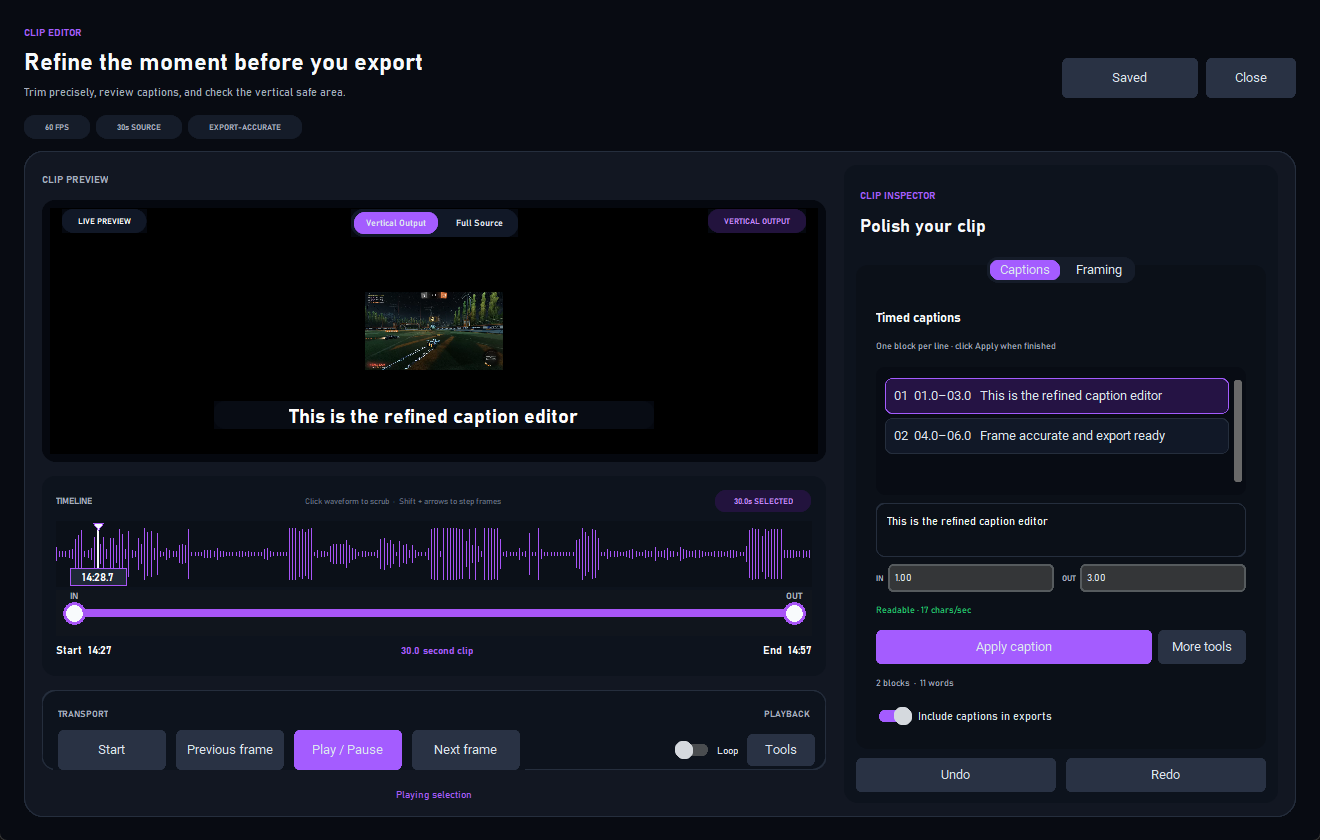
A real clip editor
AI gets you close.
You finish the thought.
Compare source and output, scrub the waveform, step frame by frame and correct captions without leaving TLTO.
Focused caption reviewCheck the uncertain words instead of rereading everything.
Directed framingGuide crop, safe area and punch-ins.
Export-accurate previewReview the result you are actually creating.
What is new for October
A complete local studio.
Not a collection of shortcuts.
Every addition has been designed around speed, control and a finished file you can trust.
Specialist signals that read the whole story
TLTO combines speech, scenes, movement, programme audio, visual evidence, hooks and story structure to find coherent moments—not isolated spikes.
Adaptive, dialect-aware captions
Word-level timing, UK and Ireland dialect profiles, creator vocabulary, uncertain-word rescue and reusable transcripts—managed inside TLTO.
Moment Map and Audience Forecast
See where the strongest windows live, inspect hook strength and pacing, and understand why TLTO believes a moment deserves attention.
Framing, branding and sound you control
Correct words, choose the caption track, guide the crop, add punch-ins, place a watermark and preview the actual finished format before export.
Clips, thumbnails and directed full videos
Turn one source into adaptive-length highlights, thumbnail options, a captioned original or a structured full-video cut with a Coming Up montage.
Verified exports and built-in review
Recover interrupted queues, check cadence and timing, release AI resources before rendering, and review finished videos inside TLTO's own player.
The new TLTO Studio
Every major upgrade.
One creator workflow.
These are not hidden technical changes. Each one removes a repetitive job, strengthens a result or gives the creator a decision that other automatic tools take away.
01Audio track control
Tell TLTO exactly what to listen to.
Name every source track, choose one or more clean voice tracks for captions, choose separate programme audio for discovery, and decide what viewers hear in the export.
- Separate Captions and AI choices
- Saved track names
- Cleaner speech, stronger captions
02Creator DNA · My Cut
An editor that learns your decisions.
After five saved edits, My Cut can propose timing, captions, framing and movement that reflect your own choices. Learning stays local, visible and reversible, with Original always available.
- Unlocks after five edits
- Private local learning
- Original versus My Cut
03Full Video Director
Long-form editing becomes a real feature.
Choose a Story, Viral, Podcast or other direction and a 3, 5, 8 or 12 minute target. Review the Coming Up montage and Hook, Setup, Build-up and Payoff before TLTO renders anything.
- Exact scene previews
- Change direction before render
- Rebuild without analysing again
04Caption intelligence
Fast where speech is clear. Careful where it is not.
Smart mode starts efficiently and rechecks only uncertain or uncovered speech when enhanced models are available. Fast stays single-pass; Precision favours the most demanding accents and audio.
- UK and Ireland dialect profiles
- Vocabulary and replacements
- Profanity and hallucination controls
05Creator branding
Finish the identity as well as the edit.
Add a channel logo, let TLTO remove a simple background, choose its position and size, then attach reusable intro and outro videos without opening another editor.
- Watermark placement and opacity
- Optional background removal
- Intro and outro default to full videos
06Adaptive highlights
A target length—not a chopped sentence.
A 30-second request guides the result without forcing a bad cut. TLTO can extend or tighten a moment to protect the setup, action and payoff, then track faces for vertical, square or landscape output.
- Semantic clip boundaries
- Face-aware reframing
- 9:16, 1:1 and 16:9
07Full-source caption studio
Watch, search and correct before export.
Play the complete video beside its transcript, follow the active word, search any phrase, edit wording in context and preview animation and colour before captions are burned in.
- Live word tracking
- Searchable playback editor
- Reusable transcript and styles
08Dependable workspace
Built for real projects and real PCs.
Readiness checks, safe hardware fallbacks, resumable model downloads, queue recovery, project relinking, diagnostics and one-click preview cleanup keep work moving when a machine is imperfect.
- Clear progress and recovery
- Free-space cleanup
- History and time-saved tracking
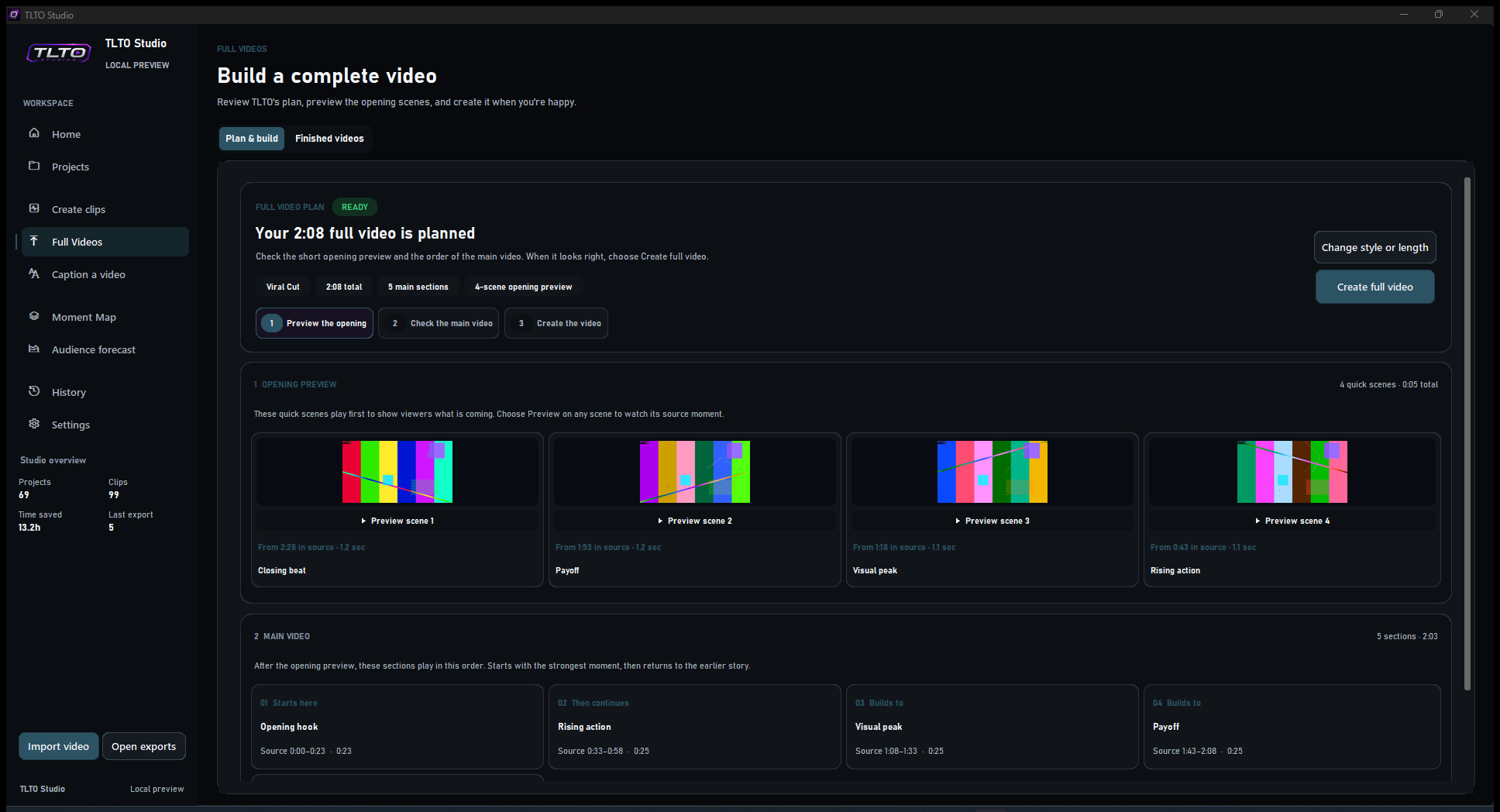
Full Video Director
See the opening.
Direct the whole story.
TLTO turns the strongest moments into a reviewable long-form plan before rendering. Preview every Coming Up scene, inspect the main-video order and change the style or target length without analysing the source again.
01 Review before render02 Preview every scene03 Rebuild without re-analysis
A different kind of AI video studio
Your computer.
Your footage. Your pace.
TLTO is designed as a complete Windows studio, not a browser queue that charges again whenever you process more footage.
Typical cloud clipperTLTO Studio Pro
Upload footage for processingFootage stays on your PC
Credits or media-hour allowancesUnlimited local processing
Clip suggestions onlyClips, captions, thumbnails and full-video edits
Separate tools for every finishing taskDirector, captions, branding and review together
Accept the automatic resultEdit timing, framing and every caption
Private, verified and prepared
Install once.
Start creating.
The October installer includes TLTO's core local analysis, caption fallback, video engine, review player and OCR. TLTO manages verified enhanced speech assets, checks hardware and always keeps a safe fallback path.
No manual model setupNo footage uploadAutomatic recovery
SYSTEM READINESSREADY
Specialist analysisTranscript, scene, audio and motion signals ready
PASSAdaptive captionsBundled fallback and verified enhancements ready
PASSVideo engineGPU checked, CPU fallback ready
PASSWorkspace storageEnough room for this project
PASSIf an enhanced path cannot run on a machine, TLTO explains why and continues with its dependable standard path.
The TLTO workflow
Four steps from source
to a finished video.
Import
Choose a long video. TLTO checks it and prepares a private local workspace.
Understand
Built-in AI follows the full transcript, visuals, energy and story to rank the best moments.
Refine
Compare reasons, trim precisely, correct captions and direct the framing.
Export
Create verified clips, thumbnails, captioned videos or a full-video edit from one reliable queue.
Simple creator pricing
Start free.
Create without credits.
Try the core workflow without payment details. Upgrade for unlimited local processing for individual creator use—without AI credits or media-hour allowances.
TLTO FREESTART HERE
£0
No card required
Experience the core TLTO workflow on your own footage.
- Videos up to 10 minutes
- Up to three highlights per analysis
- Basic review and trimming
- 720p exports
COMPLETE STUDIO
TLTO PROMONTHLY
£19.99
per month
Every professional tool, with the flexibility to cancel.
- Unlimited local processing for individual creator use
- Adaptive captions and multi-track audio control
- Creator DNA, Moment Map and Audience Forecast
- Full Video Director, branding, intros and outros
- 1080p and 4K output
TLTO PROBEST VALUE
£179.99
per year · save £59.89
The complete studio with approximately three months included.
- Everything in TLTO Pro Monthly
- One predictable annual payment
- Use on up to two Windows PCs
- Future Pro improvements included
Paid checkout opens with the signed production installer and licence activation. Questions? support@tltostudio.uk
Built for Windows creators
Everything managed.
Requirements made clear.
The core studio is bundled. Optional enhanced speech assets use additional storage, and TLTO downloads, verifies and updates them for you.
- Operating system
- 64-bit Windows 10 22H2 or Windows 11
- Memory
- 8 GB recommended; more memory helps long and high-resolution projects
- Storage
- About 2 GB for the core app; keep at least 7 GB free plus room for sources and exports
- Graphics
- Optional supported NVIDIA, AMD or Intel acceleration
- Display
- 1280 x 720 minimum practical workspace
Built with working creators
Help us make October
genuinely excellent.
Our private testers pressure-test real projects—not staged demos. We want the honest details: what feels fast, what feels slow, where captions need work, what is confusing and what saves meaningful time.
Caption accuracyWords, timing, overlap and animationAnalysis qualityMoment choice, framing and usefulnessReal performanceTranscription, preview and export speedReliabilitySetup, recovery and different Windows PCs
Two dads. One serious goal.
Built by creators
who needed it too.
TLTO Studio is created and owned by Gary McAlpine and Jordan Ferris: two dads building the tool they wished existed—one that saves creators hours, respects their footage and might just change their own families' lives along the way.
Gary McAlpine
Co-founder & Co-owner
Leads product engineering, creator workflow and the relentless push to make TLTO faster, clearer and more dependable.
Jordan Ferris
Co-founder & Co-owner
Shapes product direction, tests the real experience and helps turn demanding creator problems into useful, human tools.
Questions, answered
Clear before
you create.
Honest answers about what is included, what runs locally and what hardware helps.
Are my videos uploaded to the cloud?
No. Analysis, transcription, previews and exports run locally on your Windows PC. Internet access is used for licence validation, updates and verified optional speech-model downloads—not to upload your footage.
Do I need to install AI models myself?
No. TLTO includes a dependable captioning fallback and manages verified enhanced speech assets for you. Downloads are resumable and checked before TLTO uses them.
Can I caption a full video without editing it?
Yes. Caption a Video preserves every frame and the full duration, adds your selected caption style and exports a finished captioned copy.
Which caption mode should I choose?
Smart is the recommended balance: it handles clear speech efficiently and can revisit uncertain areas with enhanced speech models. Precision prioritises difficult accents and noisy audio; Fast prioritises turnaround with one pass.
Do I need a powerful graphics card?
No. TLTO uses supported acceleration when available and falls back to CPU paths when it is not. An NVIDIA GPU can make transcription and export faster, but it is not required.
Can I change what the AI finds?
Yes. Suggested moments can be trimmed, reframed, recaptioned or ignored. TLTO accelerates the first cut; you keep editorial control.
Which layouts can I export?
TLTO supports vertical 9:16, square 1:1 and landscape 16:9 clips, captioned full videos, and directed full-video edits.
What is included with TLTO Free?
TLTO Free supports source videos up to 10 minutes, finds up to three highlights per analysis and exports at 720p so you can try the core workflow before upgrading.
When is TLTO launching?
The next Windows release is planned for October 2026. Clean-PC testing and final compatibility work are underway now.
How does activation work?
After purchase, your checkout confirmation takes you to a secure activation page with your licence. Copy it into TLTO to unlock Pro on up to two of your own Windows PCs.
How fast is captioning?
Speed depends on video length, resolution and your PC. TLTO uses supported hardware acceleration where it helps, falls back safely when it does not, and reuses completed transcripts so later style changes are much faster.
Can I correct captions before export?
Yes. Play the video beside the transcript, follow the active words, search the full recording and correct any wording before captions are burned into the finished video.
Can captions listen to only my microphone track?
Yes. Multi-track sources let you choose caption-listening tracks separately from programme-audio analysis and the tracks included in the finished export.
Can TLTO add my logo, intro and outro?
Yes. Pro can place a reusable watermark and can attach intro and outro videos. They default to full-video outputs only, and you can independently enable them for other exports.
What is Creator DNA?
Creator DNA learns from editing choices saved on your PC. After five edits, My Cut can propose an alternative based on your style. Original remains available, and you can reset the learning whenever you want.
October 2026 · TLTO Studio for Windows
Your footage already
contains the moment.
TLTO helps you understand it, caption it, refine it and finish it—without turning your video into somebody else's cloud workload.
Register for launch Specialist local analysis · Adaptive captions · GPU optional