
THE SHORT VERSION
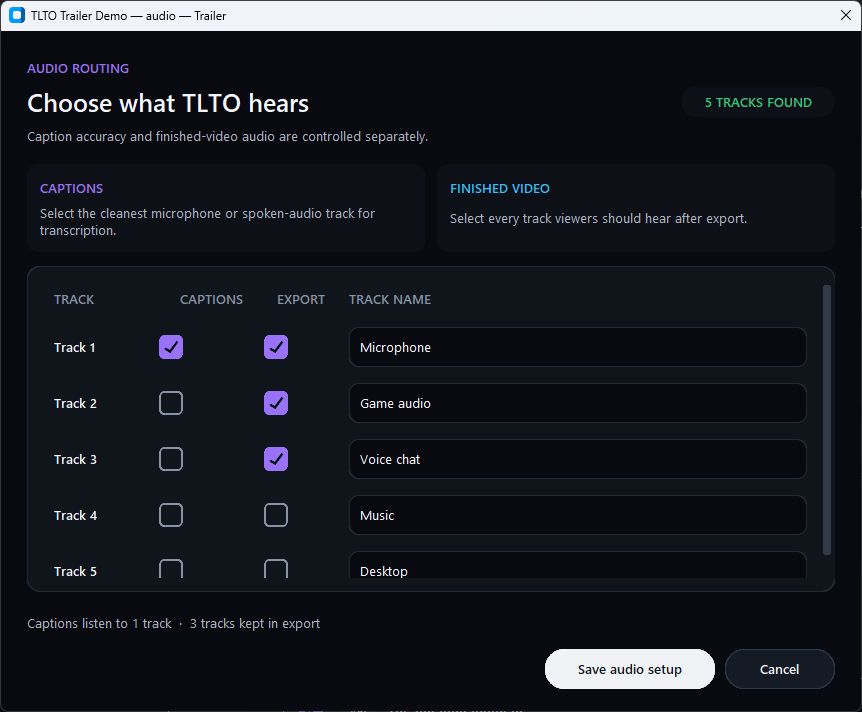
- CAPTIONS controls what transcription listens to.
- EXPORT controls which existing tracks viewers hear.
- This is track selection, not AI separation of a mixed recording.
Check that the recording really has separate tracks
Import the video and inspect Audio tracks on the source card. You can also find Audio tracks → Manage through Output settings. For Caption a video, use Manage audio tracks.
One stereo track is still one mixed track, even if it contains your microphone, friends and game. A single-track source uses automatic selection; the manual routing control is disabled. Record separate sources on separate tracks in future recordings if you want independent control.
Select the speech track for captions
Under CAPTIONS, choose the track containing the clearest microphone or commentary. More tracks are not automatically better: adding music, game effects or duplicate speech can make transcription harder.
Use TRACK NAME to give tracks useful labels such as Microphone, Game or Voice chat. Names help you understand the setup; renaming a track does not change what was recorded on it.
Choose what stays in the finished video
Under EXPORT, select the tracks the audience should hear. For example, captions can listen to your microphone while the export includes microphone, game audio and relevant voice chat.
Avoid selecting both a full mixed track and the separate component tracks if that duplicates the same sound. Listen for doubled voices and an unbalanced mix. Do not rely on clearing every checkbox to create silence: empty selections have fallback behaviour.
Save before finding highlights
Select Save audio setup. In the clip workflow, changing this setup clears the existing highlight results, so run Find best clips again. Decide your routing early to avoid redoing a review.
There is no separate AI-analysis checkbox column in this window. You choose caption and export tracks independently; TLTO handles programme-audio analysis separately and selects a suitable source track automatically.
Review both the words and the mix
Preview a section with speech and a section with game action. Correct the captions in context, then listen to the export preview to confirm that the sounds you wanted are still present.
Finally, open the exported file and check it again. Track routing gives you control over existing audio—not a guarantee of a perfectly balanced recording or a way to recover sound that was never recorded.
Before you post
- The captioning part of this workflow requires Pro.
- TLTO does not isolate voices, music or effects from a single mixed track here.
- Use only footage, music and voices you have the necessary permission to publish.
YOUR FOOTAGE. YOUR FINAL SAY.
Put the workflow to work.
Explore TLTO for Windows and choose the tools that fit your next video. Read the installation notice before downloading.